
Photography Studio Setup for Beginners: A Practical Guide to Building Your Creative Space
Introduction
Setting up a photography studio is a significant milestone for any photographer looking to move beyond casual shooting and build a professional workflow. Whether you’re a hobbyist ready to take your craft seriously or an aspiring professional aiming to establish a client-ready space, understanding the fundamentals of a photography studio setup is critical.
A well-organized studio doesn’t just provide a controlled environment for capturing stunning images; it also streamlines your workflow, enhances creativity, and impresses clients. However, starting your studio can feel overwhelming. Questions like where to start, what gear is essential, how to set up lighting, and how to maximize space often arise. This guide is designed to demystify the process, focusing on practical, real-world advice that you can apply right away.
We’ll explore everything from choosing your studio space—whether that’s a dedicated room or a home photography studio setup—to selecting the right lighting equipment and accessories. You’ll learn how to arrange your gear efficiently, manage your shoots professionally, and keep your workspace adaptable for various photography genres like portraits, product shoots, or small commercial projects.
By the end of this article, you’ll have a clear step-by-step framework for starting your own photography studio setup, complete with actionable tips and examples. This guide prioritizes practical solutions over fluff, so you can confidently invest in your photography business and deliver consistent, high-quality results.
Key Takeaways
– A successful photography studio setup starts with choosing the right space and organizing it efficiently to suit your shooting style and business needs.
– Lighting is the cornerstone of any lighting studio; understanding different types of lights and how to control them will transform your images.
– Essential gear includes cameras, lenses, lighting equipment, backdrops, stands, and storage solutions—all tailored to your budget and workflow.
– A home photography studio setup can be just as effective as a commercial one when designed with planning and adaptability in mind.
– Streamlined client management, workflow organization, and consistent studio maintenance are crucial for long-term success.
– Avoid common beginner mistakes like overspending on unnecessary gear or neglecting lighting control.
– A step-by-step approach to building your studio ensures you focus on fundamentals first, then gradually expand as your skills and business grow.
1. What Space Do You Need for Your Photography Studio Setup?
Choosing the right space for your photography studio setup is the foundational step. Your space dictates the kind of photography you can do, your lighting options, and how you organize your workflow.
Considerations:
– Size and Ceiling Height: For portrait or product photography, a room with at least a 10×12 feet floor area and 8-10 feet ceilings is ideal. This space provides enough room for lighting setups, backdrops, and movement between the camera and subject.
– Natural Light vs. Controlled Lighting: If you plan to use natural light, large windows with diffusers are important. For a lighting studio setup reliant on strobes or continuous lights, blackout curtains or a windowless room help control light precisely.
– Noise and Privacy: Choose a quiet, private area to minimize distractions during shoots. This is particularly important for client sessions and video content.
– Accessibility: Ensure easy access for clients and equipment delivery. If you’re setting up a home photography studio setup, dedicate a room or a portion of a room that you can keep organized and ready for shoots.
Example:
Jessica, an aspiring portrait photographer, converted her spare bedroom into a home photography studio setup. She installed blackout curtains, painted the walls neutral gray, and used a collapsible backdrop system. This allowed her to control lighting and backgrounds without needing a large commercial space.
Actionable Tip:
Measure your space and sketch a floor plan to visualize where you’ll place your lights, camera, and subjects. Plan walkways and storage zones to keep your studio functional.
—
2. Essential Gear for Beginners: What to Invest In First?
Starting your photography studio setup requires prioritizing gear that delivers the most value and versatility.
Core Essentials:
– Camera and Lenses: Start with a reliable DSLR or mirrorless camera and a versatile lens, such as a 50mm f/1.8 or 24-70mm f/2.8. These lenses cover portraits, product shoots, and general use effectively.
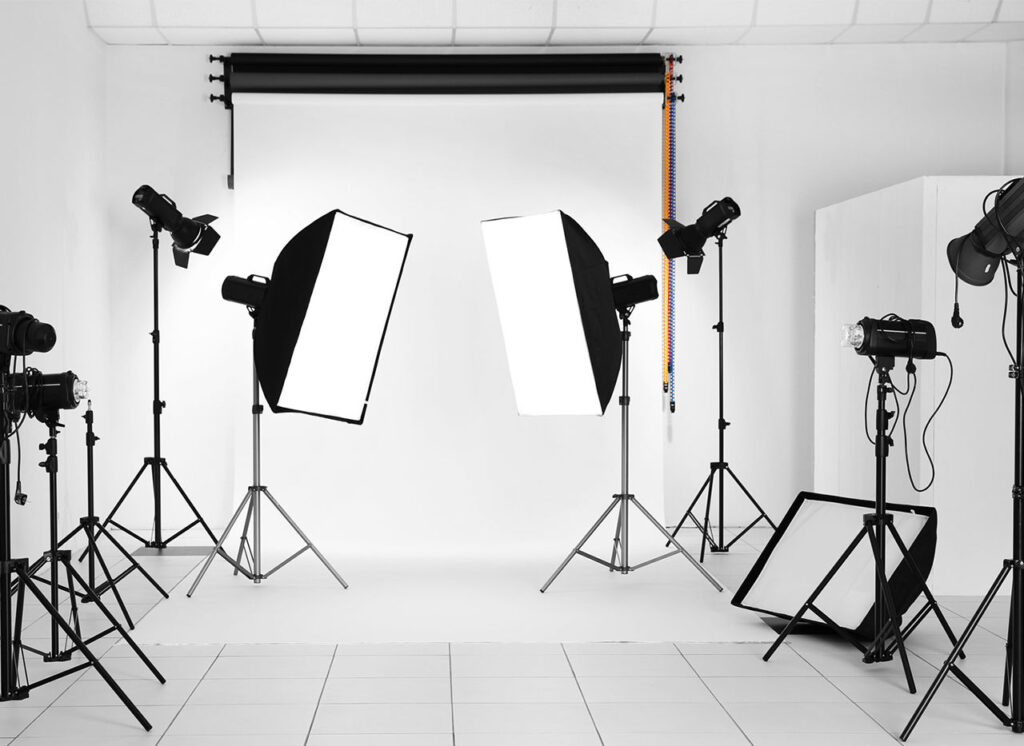
– Lighting Equipment: For a lighting studio setup, invest in at least one or two light sources. Beginners often start with continuous LED lights or affordable studio strobes paired with softboxes for soft, controlled lighting.
– Backdrops: Purchase neutral and versatile backgrounds—white, black, and gray muslin or paper rolls. You can add colors or textures as you grow.
– Light Stands and Modifiers: Sturdy light stands and modifiers like umbrellas, softboxes, reflectors, and grids help shape light creatively.
– Tripods: A solid tripod stabilizes your camera for sharp images, especially in low light or product photography.
– Storage and Organization: Shelving units, bins, and cable management tools keep your gear safe and accessible.
Budget Advice:
Don’t buy expensive, high-end gear right away. Focus on mastering what you have. Renting specialized equipment for specific projects can be more cost-effective.
Example:
Mark, a product photographer, started with a single continuous LED panel and a white backdrop. Over time, he added a second light and softboxes, which dramatically improved his product shots.
Actionable Tip:
Make a gear checklist based on your photography niche and start with multipurpose, budget-friendly equipment you can build upon.
—
3. Understanding Lighting: The Heart of Your Lighting Studio
Lighting is arguably the most important element in your photography studio setup. It controls mood, highlights, shadows, and overall image quality.
Types of Studio Lighting:
– Continuous Lighting: These lights stay on during shooting, allowing you to see the effect in real-time. Great for beginners and video work but sometimes less powerful than strobes.
– Strobes/Flash Lighting: Powerful bursts of light that freeze motion. They require more learning but offer superior control and quality.
Key Lighting Concepts:
– Key Light: The main light source illuminating your subject.
– Fill Light: Used to reduce shadows created by the key light.
– Backlight/Rim Light: Separates the subject from the background by creating a subtle outline.
– Modifiers: Tools like softboxes, umbrellas, and reflectors change the quality and direction of light.
Practical Setup Example:
A simple two-light setup with a key light softbox positioned at 45 degrees to your subject and a fill light reflector or softbox on the opposite side often produces flattering portraits.
Actionable Tip:
Experiment with light placement and modifiers. Start by moving your key light closer or farther to adjust softness, and add a reflector to fill shadows gradually.
—
4. How to Build a Functional Home Photography Studio Setup
Many photographers begin by setting up a home photography studio. With limited space and budget, strategic planning is essential.
Steps to Build Your Home Studio:
1. Choose Your Location: Dedicate a room or corner with enough space for your gear and subjects.
2. Control Ambient Light: Use blackout curtains or blinds to regulate natural light.
3. Invest in Portable Lighting: Compact LED panels or battery-powered flash units offer flexibility.
4. Use Multi-Purpose Gear: Opt for collapsible backdrops and foldable reflectors to save space.
5. Organize Efficiently: Install shelves, hooks, and carts for gear storage. Keep cables tidy with Velcro straps.
6. Create a Workflow Zone: Designate areas for shooting, editing, and client meetings if space allows.
Example:
Anna transformed a 12×10 foot garage bay into her home photography studio setup. She insulated the space, added LED panels, and mounted a backdrop system on the wall. This allowed her to shoot portraits and small products year-round.
Actionable Tip:
Maximize vertical space by using wall-mounted storage and overhead lighting mounts to free up floor area.
—
5. How to Choose and Use Backdrops and Props Effectively
Backdrops and props set the scene and reinforce your photography style. Selecting the right ones enhances the storytelling in your images.
Backdrop Types:
– Paper Rolls: Smooth and crease-free; ideal for clean, consistent backgrounds.
– Muslin/Fabric: Textured and reusable but require ironing or steaming.
– Vinyl: Durable and easy to clean, suited for product photography.
Prop Selection:
Keep props minimal and relevant to your subject to avoid distractions. For portraits, simple chairs, stools, or decorative items work well.
Practical Advice:
– Match backdrop colors with your subject’s clothing and skin tone for flattering results.
– Use neutral tones for product photography to keep attention on the item.
– Rotate backdrops and props seasonally or by client niche to keep your portfolio fresh.
Example:
David, a newborn photographer, uses soft neutral fabric backdrops with cozy knitted blankets and baskets as props to create warm, inviting images.
Actionable Tip:
Invest in a backdrop stand system with adjustable height to accommodate subjects of different sizes and shoot styles.
—
6. Organizing Your Studio Workflow for Efficiency and Consistency
A well-planned photography studio setup isn’t just about physical space and gear; it’s about creating a workflow that reduces stress and increases productivity.
Workflow Framework:
– Pre-Shoot Preparation: Charge batteries, clean lenses, set up lighting, and prepare backdrops the day before.
– Client Communication: Have a clear process for bookings, contracts, and shoot consultations.
– Shoot Execution: Follow a checklist to ensure you cover all poses or product angles efficiently.
– Post-Shoot Organization: Download and back up images immediately; organize files with consistent naming conventions.
– Editing Workflow: Use presets or batch edits to maintain a consistent look and speed up processing.
Example:
Lena, a wedding photographer, uses a checklist app to prepare her studio and gear before every shoot. This habit eliminates last-minute issues and enhances client confidence.
Actionable Tip:
Create physical or digital checklists for each shoot phase and review them regularly to improve your process.
—
7. Managing Your Photography Studio Business: Client Experience and Professionalism
Your photography studio setup is part of a broader business system. How you manage clients and present professionalism impacts your success.
Client Experience Tips:
– Comfortable Studio Environment: Provide seating, water, and a clean space to make clients feel welcome.
– Efficient Scheduling: Use online booking tools to avoid double bookings and reduce no-shows.
– Clear Pricing and Deliverables: Be transparent about costs, turnaround times, and what clients receive.
– Professional Contracts: Protect yourself and your clients with clear agreements covering usage rights and payment terms.
– Follow-Up: Send thank-you notes, request feedback, and encourage referrals.
Example:
Sarah increased repeat bookings by adding a comfortable waiting area in her home photography studio setup and sending personalized follow-up emails after each session.
Actionable Tip:
Develop a client welcome packet outlining your process, expectations, and policies to set the tone from the start.
—
Common Mistakes
Many beginner photographers make similar mistakes when setting up their studios. Recognizing and avoiding these pitfalls saves time, money, and frustration.
Mistake 1: Overspending on Gear Before Mastering Basics
New photographers often buy expensive cameras, lights, or accessories without understanding how to use them effectively. Instead, start with affordable, versatile gear and invest in learning lighting and composition.
Mistake 2: Ignoring Lighting Control
Relying solely on ambient or natural light without controlling or modifying it leads to inconsistent results. Learn to use basic lighting modifiers and invest in blackout options in your studio space.
Mistake 3: Poor Space Planning
A cramped or cluttered studio hinders creativity and workflow. Take time to organize your gear, create clear shooting zones, and plan storage.
Mistake 4: Neglecting Client Comfort and Professionalism
Failing to consider the client’s experience in your studio—such as providing seating, privacy, or clear communication—can hurt your reputation and referrals.
Mistake 5: Skipping Workflow Systems
Without organized workflows for shooting, editing, and client management, you risk delays, lost files, and burnout.
Mistake 6: Using Too Many Props or Distracting Backdrops
Overloading your set with props or busy backgrounds can distract from the subject and reduce image quality.
Mistake 7: Not Testing Gear Before Sessions
Failing to test lighting setups or camera settings before clients arrive wastes valuable time and creates stress.
Actionable Advice:
Build your studio and skills incrementally. Focus on mastering fundamentals and client service before expanding your gear inventory.
—
What to Do Now
If you’re ready to set up your photography studio, here’s a practical action plan to get started immediately:
1. Assess Your Space: Measure your available area and decide if it suits your photography goals. Sketch a layout considering lighting and shooting zones.
2. Inventory Your Gear: List what you already own and identify essential items you need next, prioritizing lighting and backdrops.
3. Plan Your Lighting Setup: Choose between continuous lights or strobes based on your budget and shooting style. Purchase or rent your first light modifier.
4. Organize Your Workspace: Dedicate a spot for gear storage, charging stations, and workspace for editing.
5. Create Workflow Checklists: Draft simple checklists for pre-shoot setup, client communication, and post-shoot tasks.
6. Start Small: Run practice shoots with friends or family to test your space and lighting setup before booking clients.
7. Build Client Experience: Develop a welcome packet and outline your session process. Practice clear communication.
8. Maintain Your Studio: Schedule regular cleaning and gear checks to keep your space professional and functional.
9. Educate Yourself: Invest time in tutorials or workshops focused on studio lighting and business management.
Example Mini Project:
Set a weekend goal to set up one lighting station with a softbox and backdrop. Run 5 test shots with different light placements and review the results to learn how light affects your subject.
Taking these concrete steps grounds your photography studio setup in real-world practice. Remember, your studio will evolve as your skills and business grow. Staying organized and client-focused ensures a strong foundation.
—
FAQs
Q1: How much space do I need for a beginner photography studio setup?
A beginner studio typically requires at least a 10×12 feet room with an 8-foot ceiling. This allows enough room for lighting setups, backdrops, and movement between the camera and subject. If space is limited, focus on compact gear and multi-purpose equipment to maximize your home photography studio setup.
Q2: What type of lighting is best for beginners setting up a studio?
Continuous LED lights are ideal for beginners because they allow you to see lighting effects in real time, making adjustments easier. However, if you want more power and control, studio strobes are excellent once you’re comfortable with flash photography. Starting with one key light and reflectors is a practical approach.
Q3: Can I create a professional studio setup at home?
Absolutely. Many photographers start with a home photography studio setup by dedicating a spare room or corner. Controlling ambient light with blackout curtains, using portable lighting kits, and organizing gear efficiently can create a professional environment suitable for portraits, products, and more.
Q4: How do I choose backdrops for my studio?
Start with neutral colors like white, black, and gray for maximum versatility. Paper rolls provide a smooth look, while muslin backdrops add texture. Choose backdrops that complement your photography style and client needs. Collapsible and portable backdrops offer flexibility for small spaces.
Q5: What’s the best way to organize my studio workflow?
Develop checklists for each stage: pre-shoot preparation, client communication, shoot execution, and post-shoot editing. Use consistent file naming and backup systems. Planning your workflow reduces stress, ensures nothing is missed, and speeds up your delivery to clients.
—
Conclusion
Building a photography studio setup is a rewarding step that elevates your craft and business professionalism. Whether you’re working within a home photography studio setup or a dedicated commercial space, the principles remain the same: prioritize lighting control, organize your gear thoughtfully, and streamline your workflow.
Starting with the right space, investing in essential gear, and mastering lighting fundamentals gives you the tools to create consistent, high-quality images. Remember that your studio is a dynamic environment—you’ll adjust your setup as your skills and client base grow.
Beyond the physical space, focus on creating an excellent client experience through clear communication, a comfortable environment, and professional processes. This will set you apart and help build a sustainable photography business.
Take a step-by-step approach: assess your needs, plan carefully, and practice regularly. With patience, creativity, and organization, your photography studio setup will become a powerful asset that supports your artistic vision and business goals.
Now, it’s time to roll up your sleeves and start crafting your perfect photography studio setup. Your future clients—and your portfolio—will thank you.

